
 Join
JoinFrom Chalkboards to AI
Discovering AI Gems
By Christine Anne Royce, EdD, and Valerie Bennett, PhD, EdD
Posted on 2026-03-17

Disclaimer: The views expressed in this blog post are those of the author(s) and do not necessarily reflect the official position of the National Science Teaching Association (NSTA).
While an Artificial Intelligence (AI) user can enter any potential query, the reality is that AI doesn’t always deliver the expected outcome. The reason could be the language, the context, or simply a mismatch between your terminology and what the Large Language Model has been trained to use. It would be wonderful if there were “specialized AI assistants” that would be more on target when answering a query. Well, we are in luck, they are called Google Gems.
Google Gems are custom versions of Gemini that act as specialized AI assistants. For example, Gems can serve as "thought partners" that remember your specific instructional frameworks, grade levels, and pedagogical goals so you don’t have to retype them every time.
Where Do I Find These Gems?
Up to this point, I had been thinking mostly about Gems as something teachers build themselves, and that raised a new question: if teachers can build them, what already exists? Are there examples where someone else has already done the design work? In researching this topic, I ran across EduGems.ai, a site featuring Gems that was developed, curated, and shared by Eric Curts. I reached out to him and asked a few questions to tap into his expertise.
One of the questions I posed was about the value of Google Gems in general and how a teacher might start curating different Gems that serve different purposes for their classroom. His response showed not only the value in using Gems but also how easy the process to create Gems was.
“Gems are an easy way to create, use, and share powerful Gemini prompts to help educators and students. This can be a great way to assist people in using AI for helpful tasks. Additionally, Gems allow you to add up to 10 reference files to the Gem to provide it with grounding materials to pull from, such as standards, curriculum guides, and more. Schools can create and share collections of high-quality Gems that align to their vetted materials. Another benefit of Gems is that Google provides free, unlimited use of Gemini for everyone, so the Gems can be used as much as needed. Educators get an additional benefit of having built-in data privacy protection when using Gemini with a school account.”
GEMS can include targeted materials, allowing teachers or districts to personalize the output. Eric further added that teachers can easily copy Gems on his EduGems website and can also use a support Gem called EduGem Generator, which he developed, to help them create their own Gems.
Uncovering Existing Gems
Eric’s Gems website prompted another question about the types of Gems that he has created and how teachers can access them. Eric noted that his site “is a collection of over 100 Gemini Gems that anyone can access, use, and copy for free. To use any of the Gems, the user does need to have access to Google Gemini, but that is free for anyone. Teachers (or anyone) can browse through my Gems to find one they would like to use, and then simply click on the link to use the Gem. That will open the Gem in Gemini in a new tab. The user just needs to start the conversation with something like ‘Hi’ and then the Gem will run and walk them through the entire process.
After additional questioning, I learned that his collection page was like an AI treasure chest with 100+ Gems including a “wide range of educational tasks and activities for both educators and students…..some example Gems would be Lesson Hooks, Bell Ringers, Slideshow Maker, Vocabulary List, AI Debate, Learner Scaffolds, Guided Notes, Exit Ticket, Grading Partner, Graphic Novel Maker, 3D NGSS Activity, Science Lab Experiment, Emergency Sub Plan, Professional Learning Coach, and many more.”
Heading over to Gemini first, Google provides a few "starter" Gems in the sidebar (under the “Gems” or “Explore Gems” tab) that are already fine-tuned for the kind of design-partnership you're looking for:
- The Learning Coach: This is the closest existing Gem to a "thought partner." It is designed not to give answers, but to guide the user through complex topics with questions and scaffolding.
- The Writing Editor: While it sounds like a grammar checker, this Gem’s instructions are built for structural feedback. You can paste a lesson plan and ask it to "editorialize" the flow or clarity.
- The Brainstormer: This Gem is tuned to prevent "AI hallucinations" by focusing on divergent thinking—perfect for when you have a science standard but need 10 different ways to teach it.
After reviewing Eric’s suggestions and the premade Gems by Google, I took a deeper dive into how a science educator can maximize their use.
Specialized Gems
Science teachers have a unique set of needs, such as balancing lab safety, inquiry-based learning, and complex data analysis. The following are potential specialized Gems specifically for science education that have yet to be built.
- The 5E Instructional Architect: AI could be programmed to turn any science standard into a full "Engage, Explore, Explain, Elaborate, Evaluate" cycle.
- Phenomena Finder: Given a standard (e.g., NGSS MS-PS1-4), the AI suggests five "Anchoring Phenomena" that are culturally relevant and observable.
- The Lab Safety Compliance Officer: After you enter your lab procedure, the AI generates a customized safety checklist and a list of specific Personal Protective Equipment needed for that day. Safety Note: Science educators should always ensure the lesson safety guidelines are followed by reviewing them personally and instructing their students.
The Future of the Partnership
By using Gems as design partners, educators aren't replacing the teacher. Instead, they are amplifying the human part of teaching. They are offloading the administrative side of lesson planning (the formatting, the standards alignment, the search for analogies) to focus on the "relational" side, such as being present in the lab, sparking curiosity, and helping that one student who finally has an "aha!" moment.
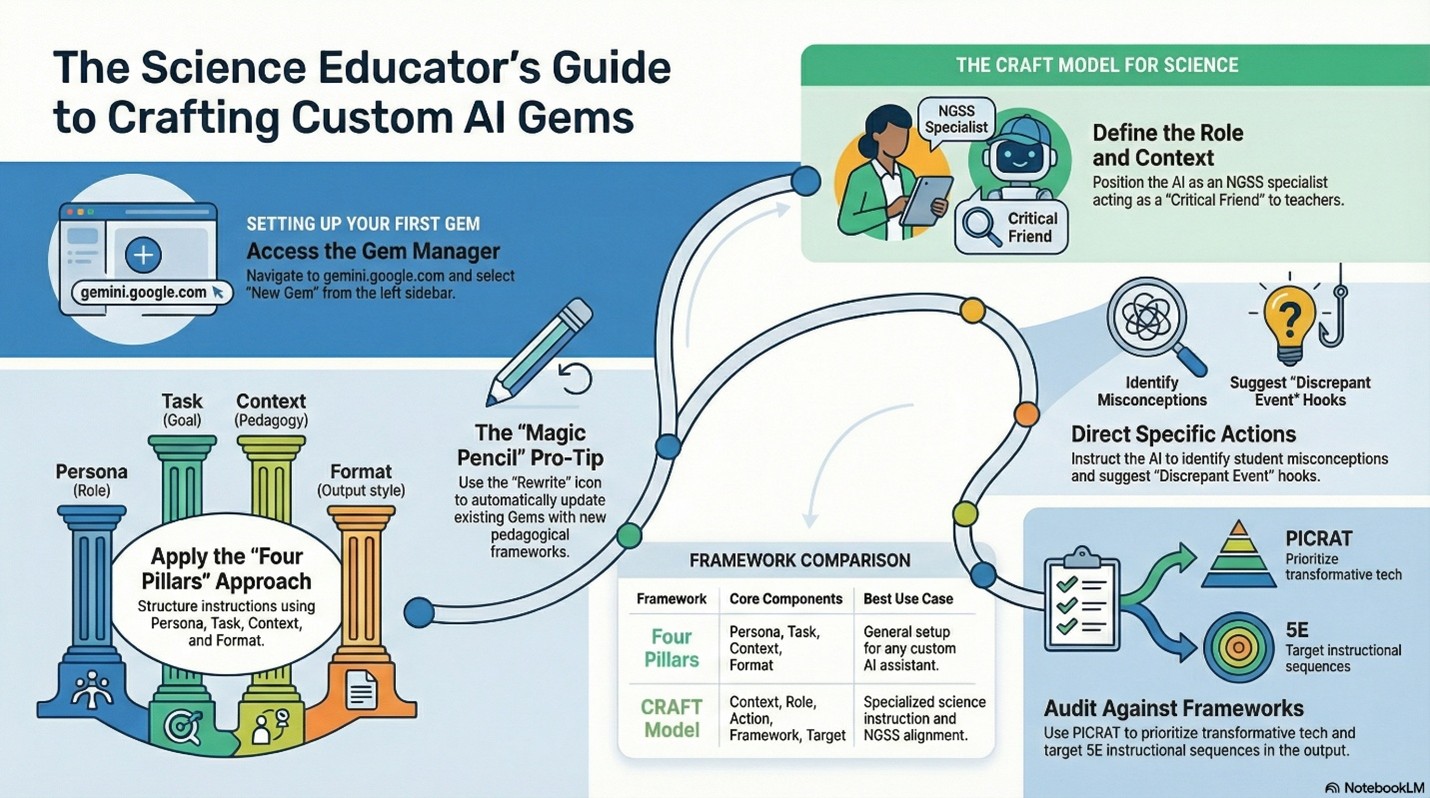
Looking to create your first Gem? Check out the infographic that provides guidance and an example.
Special thanks to Eric Curts for his time in helping us understand more about Google Gems.
The following video and audio synopsis of this blog were generated using Google NotebookLM's features. They have been reviewed for alignment to the blog and accuracy.
 Christine Anne Royce, EdD, is a past president of the National Science Teaching Association and currently serves as a Professor in Teacher Education and the Co-Director for the MAT in STEM Education at Shippensburg University. Her areas of interest and research include using digital technologies and tools within the classroom, global education, and the integration of children's literature into the science classroom. She is an author of more than 140 publications, including the Science and Children Teaching Through Trade Books column.
 Valerie Bennett, PhD, EdD, is an Assistant Professor in STEM Education at Clark Atlanta University, where she also serves as the Program Director for Graduate Teacher Education and the Director for Educational Technology and Innovation. With more than 25 years of experience and degrees in engineering from Vanderbilt University and Georgia Tech, she focuses on STEM equity for underserved groups. Her research includes AI interventions in STEM education, and she currently co-leads the Noyce NSF grant, works with the AUC Data Science Initiative, and collaborates with Google to address Computer Science workforce diversity and engagement in the Atlanta University Center K–12 community.
This article is part of the blog series From Chalkboards to AI, which focuses on how artificial intelligence can be used in the classroom in support of science as explained and described in A Framework for K–12 Science Education and the Next Generation Science Standards.
The mission of NSTA is to transform science education to benefit all through professional learning, partnerships, and advocacy.